
On 21 October 2026, PHP released an emergency fix for two critical security flaws. The same day, Ireland's National Cyber Security Centre issued an advisory, and TheJournal.ie took its own website temporarily offline while it strengthened its defences.
If your business website runs on WordPress, it runs on PHP. So this one is about you too, even if you've never heard the word.
The short version
- What happened: two flaws in PHP, nicknamed PHP2Shell, let an attacker run their own code on a web server without logging in. Both are rated 9.2 out of 10.
- Are you affected? If your site runs on WordPress, or anything else built on PHP, very likely yes until your host updates PHP.
- A WordPress update won't fix it. The flaw is in the engine underneath, so the fix has to happen on the server.
- What to do today: send your host or web designer the email further down this page.
- The bigger problem: over a third of WordPress sites already run a PHP version that gets no security fixes, and from 1 January 2027 it will be most of them.
What PHP2Shell is: a PHP vulnerability, in plain English
PHP is the programming language that WordPress, Joomla, Drupal and many shop platforms are written in. When someone opens a page on your site, the web server runs PHP to build that page. Think of WordPress as the car and PHP as the engine.
The two flaws (CVE-2026-109618 and CVE-2026-109619) are in the engine itself. The researchers at Wiz, one of the research teams that found them, says nearly every PHP version is affected, going back to PHP 5.4 from 2012, and that an attack doesn't need any mistake in your website's own code. They showed it working against a standard WordPress installation.
PHP has fixed them in versions 8.5.12, 8.4.27, 8.3.36 and 8.2.35. PHP's own advice is blunt: updating is the only safe choice.
How worried should you be? Security companies have seen attackers trying it since the day it was announced (Cloudflare, watchTowr). Since 26 October, the US cybersecurity agency CISA lists both flaws as actively exploited. Attackers are trying them on WordPress sites every day, but as of 28 October Wordfence knew of no WordPress site hacked this way, and some researchers say the published attack code doesn't work on a default set-up without a second weakness. Get it checked this week.
What we found in Carlow
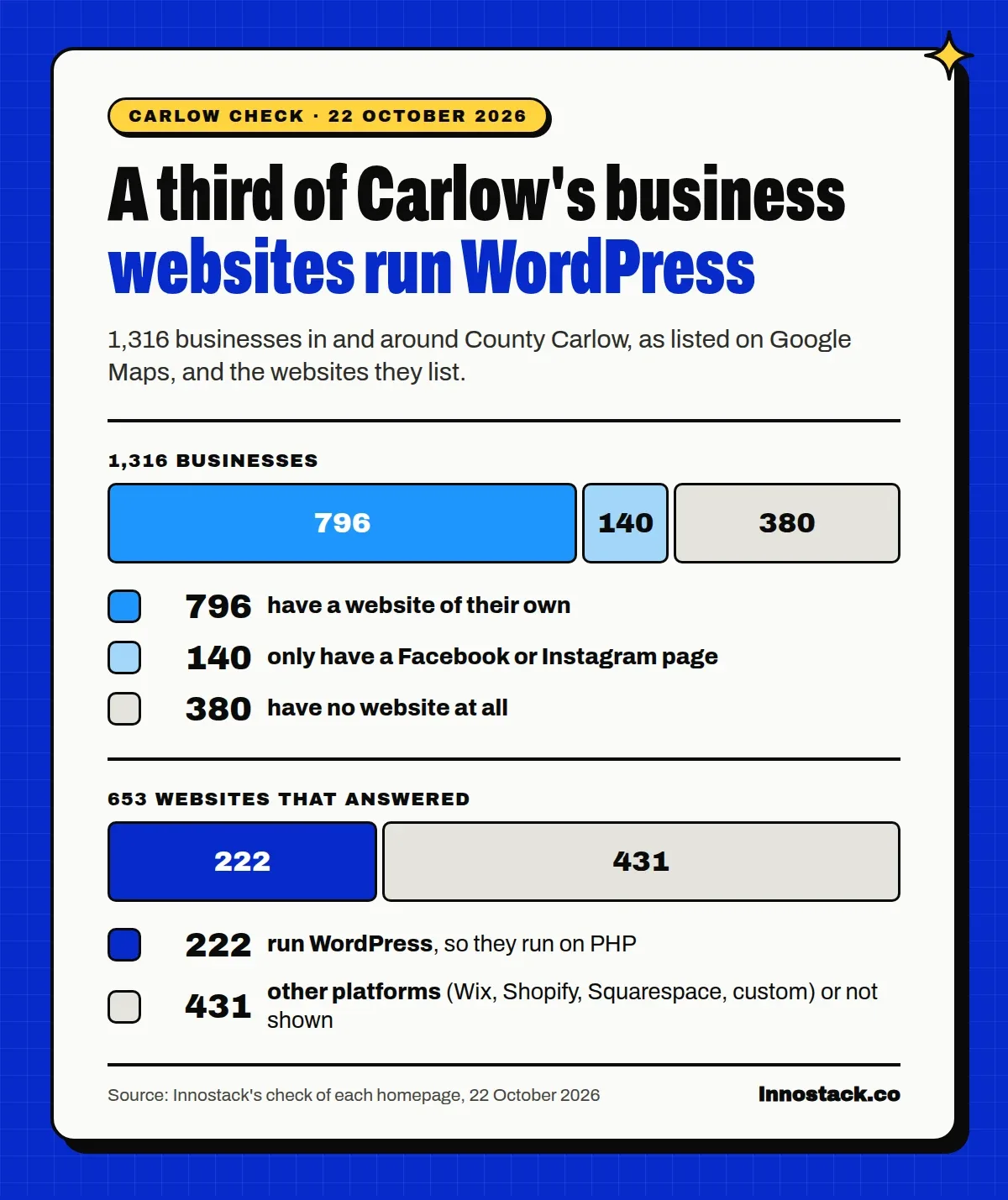
On 22 October, the day after the fix, we went through all 1,316 businesses in and around County Carlow listed on Google Maps and visited the homepage of every website they list. Just a normal page visit, the same as any customer.
- 796 businesses list a website of their own. Another 140 only have a Facebook or Instagram page, and 380 have nothing at all.
- 222 of the 653 websites that answered run WordPress, about a third. Probably more, because some sites hide it.
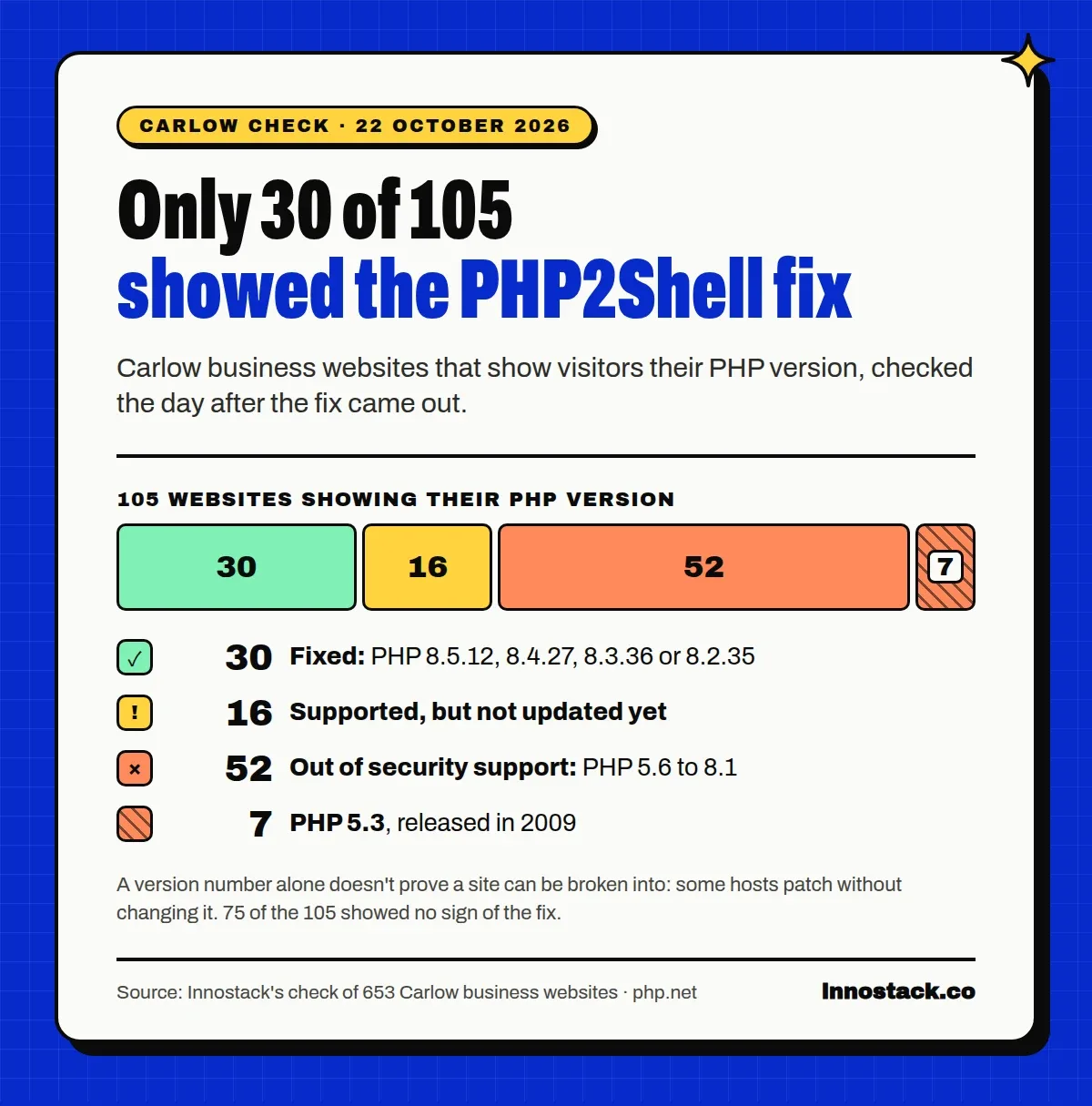
- 105 sites tell every visitor which PHP version they run. Only 30 of them showed a version with the 21 October fix.
- 59 of those 105 run a PHP version that's out of security support, and 16 more run a supported version that hadn't been updated yet. Seven still run PHP 5.3, released in 2009.
- More than 20 WordPress sites were older than WordPress 6.0 (May 2022). The oldest was WordPress 3.5, from 2012.
A version number on its own doesn't prove a site can be broken into: some hosts patch quietly without changing the number, and we checked on the day after the fix, so some will have updated since. But a site that's been left on a 2009 engine usually hasn't been looked at in a long time. We're not naming anyone. If you're not sure whether yours is one of them, the next section shows how to find out.
What to do today
Who has to fix this depends on who looks after your website.
Your site is on a normal hosting plan (Blacknight, Letshost, GoDaddy, SiteGround and so on): the host updates PHP, but you often choose which PHP version your site uses in your hosting control panel. Look for the PHP setting for your exact domain: the server's default can be different from what your site actually uses. Then ask your host whether the 21 October fix is installed.
A web designer or agency looks after your site: ask them. It's their job to know which PHP version you're on and whether your host has patched it.
You (or someone you know) set up your own server: update PHP to one of the fixed versions above and restart PHP, as watchTowr advises, because the old code stays in memory until it's restarted.
Not sure who your host is? Look at your bank statements for a yearly or monthly hosting charge. For a .ie address, the WHOIS lookup on the IE Domain Registry's website, weare.ie, shows which company your domain is registered through, and that's often your host too.
Here's an email you can copy and send:
Hi, I saw the news about the PHP2Shell security flaws (CVE-2026-109618 and CVE-2026-109619), fixed in PHP on 21 October. Could you tell me:
- Which PHP version serves my website's exact domain?
- Has it been updated to a fixed version (8.5.12, 8.4.27, 8.3.36 or 8.2.35, or your own patched build)?
- If my site is on PHP 8.1 or older, what's the plan to move it to a supported version?
- Are my WordPress plugins and theme up to date, and who keeps them that way?
- When was my last backup, and is it stored somewhere other than the server?
Thanks.
While you're at it: if your site shows its PHP version to visitors, ask them to hide it. There's no reason to tell attackers what to try.
What about online PHP version checkers? They can only see your version if your site shows it publicly. "Not detected" doesn't mean safe, and a version number can't tell you whether the fix is installed. Use them as a hint, then check properly: in WordPress, Tools, then Site Health, then Info, and open the Server section.
Moving off an old PHP version? Going from PHP 7 to PHP 8 can break an older theme or plugin, so don't just flip the switch on a live site:
- take a full backup first, files and database;
- try the new version on a copy of the site (a staging site) if your host offers one;
- check your theme and plugins support the new version, and update them first;
- afterwards, test the pages that matter: contact forms, bookings, checkout;
- know how you'd switch back if something breaks.
Patch, then check
An update stops new break-ins. It doesn't remove an attacker who got in before it.
A WordPress plugin called Bricksforge has a flaw rated 10 out of 10 that attackers have been using since 7 October to upload their own files. Updating the plugin doesn't remove files they've already planted. In September, Sucuri found a WordPress backdoor that hides in at least eight places at once (files, the database, even the server's memory), and every copy can rebuild the others after a clean-up. It can add a hidden admin account and skim card details from a checkout.
Signs worth checking, or asking your web person to check:
- admin users in WordPress you don't recognise;
- pages on Google for your site that you didn't write (search
site:yourbusiness.ieand look for spam); - a "This site may be hacked" note under your site in Google results;
- customers saying your site sent them somewhere strange, or asked them to "verify they're human" in an odd way.
We've cleaned up hacked WordPress sites for our own clients, so we know how well these things hide. Not sure about yours? Our free WordPress security check looks at your site from the outside and sends you a written answer within 2 working days.
If your website has been hacked
Most small business websites hold personal data, even "simple" ones: the messages from your contact form, booking details, newsletter sign-ups, a shop's orders. If someone got into your site, that data may have been exposed, and Irish data protection law has rules for that.
According to the Data Protection Commission:
- if the breach presents a risk to the people whose data it is, you must report it to the DPC within 72 hours of becoming aware of it, using its breach notification form;
- if it's likely to be a high risk to them, you must also tell those people directly, without undue delay;
- even if you decide there's no risk, you must keep an internal record of what happened, why you decided that, and who decided.
If you report late, the GDPR (Article 33) says you have to explain the delay. So note the date and time you first found out. This is general information, not legal advice; the DPC's own page is the place to check.
Why it matters even for a small site
It's easy to think nobody would bother with a café's website. Attackers don't pick sites by hand. They scan the whole internet for anything running a known weak version, then use whatever they get into.
In August, Check Point uncovered an operation that had taken over close to 2,000 WordPress websites and used them to show visitors a fake "I'm not a robot" check. It tricked people into running a command that installed malware on their own computers. Many of the sites were simply out of date; one was running a WordPress version from 2021 with nearly 40 known security holes. A hacked site can be used to attack the people who visit it, including your customers.
The bigger problem for WordPress security: old PHP
Many hosts have already announced they've patched PHP2Shell. The slower problem is everything that's been left behind.
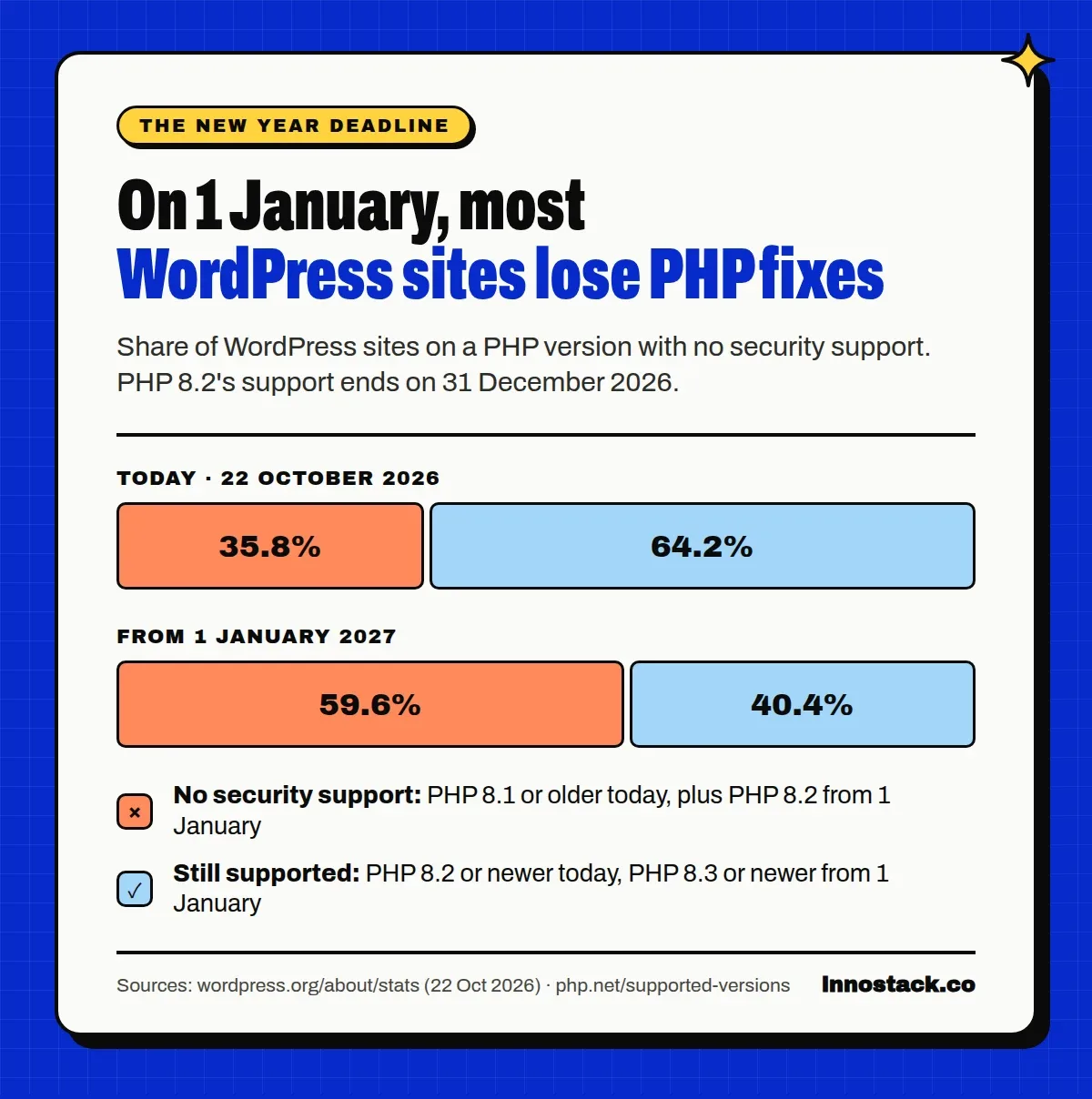
WordPress.org publishes which PHP versions its sites run. As of 22 October 2026:
- 35.8% of WordPress sites run PHP 8.1 or older, which no longer gets security fixes;
- 23.7% run PHP 8.2, which stops getting them on 31 December 2026;
- so from 1 January 2027, 59.6% of WordPress sites will be on a PHP version with no security support (WordPress.org stats).
Plugins are the other half. Patchstack counted 11,334 new security flaws across WordPress in 2025, 91% of them in plugins. Almost half had no fix from the developer by the time they were made public, and for the most attacked flaws, the median time from going public to the first attack was five hours.
WordPress itself is well looked after. A WordPress site still needs someone keeping the engine, the plugins and the theme up to date, every month, for as long as the site is live. If nobody's doing that, ask which PHP version your site runs before the new year.
Why PHP2Shell didn't touch the websites we build
The websites we build at Innostack are custom-coded and don't use PHP at all, so PHP2Shell had nothing to attack. None of our clients had to do anything this week.
They don't rely on WordPress plugins either, the source of 91% of last year's WordPress security flaws. Every site is coded for the business it belongs to, with security headers and spam-protected forms from launch day. On our hosting plan, updates, backups and monitoring are part of the monthly fee, so staying up to date isn't something you have to remember.
If your WordPress site is well maintained, you don't need to move. But if nobody can tell you which PHP version it runs, a redesign costs the same as a new site, and your content and Google rankings come with you.
Your questions, answered
Is WordPress safe?
WordPress itself is actively maintained, and its own serious flaws this year were fixed in regular updates. The risk is in what's around it: old PHP, plugins that aren't updated, and sites nobody's looking after.
Do I need to update WordPress, or update PHP?
Update PHP. Keep WordPress updated anyway, but this flaw is in PHP, so the fix has to happen on the server. Ask your host.
My site is on Wix, Squarespace or Shopify. Am I affected?
Those platforms look after their own servers, so there's nothing for you to update. It's still worth checking your account security: a strong password and two-step login.
How do I check my WordPress PHP version?
In WordPress, go to Tools, then Site Health, then Info, and open the Server section. Or ask your host with the email above.
My website has been hacked. What do I do?
Don't just delete the strange files: backdoors like the one Sucuri found rebuild themselves. Get proper WordPress malware removal, change every password, check whether personal data was exposed, and follow the Data Protection Commission steps above. If you're moving to a new site anyway, our hacked-site clean-up can be added to any redesign for €249: we remove the malware, close the hole and clear the spam pages out of Google.
Not sure where your site stands?
Send us your website address and we'll check it. Within 2 working days, we send you a written check: which PHP and WordPress versions your site runs, whether Google shows spam pages or a hacked warning for it, and what to do next. It's free, and yours to keep whether or not you work with us.
Sources
- PHP: security release for CVE-2026-109618 and CVE-2026-109619, 21 October 2026
- PHP: supported versions
- Wiz: PHP2Shell research
- watchTowr: PHP2Shell FAQ
- Cloudflare: PHP vulnerabilities and WAF protection
- NCSC Ireland: advisory on CVE-2026-109618 and CVE-2026-109619
- TheJournal.ie: site taken offline, 21 October 2026
- Patchstack: Bricksforge vulnerability exploited
- SOCRadar: Bricksforge CVE-2026-85097 exploited
- Sucuri: a self-healing WordPress backdoor
- Check Point: thousands of hacked WordPress sites, one operation
- WordPress.org: statistics
- Patchstack: State of WordPress Security in 2026
- Data Protection Commission: breach notification
- GDPR, Regulation (EU) 2016/679
- Innostack's own check of the websites of 1,316 businesses in and around County Carlow, 22 October 2026